 Loading Please Wait...Loading Please Wait...
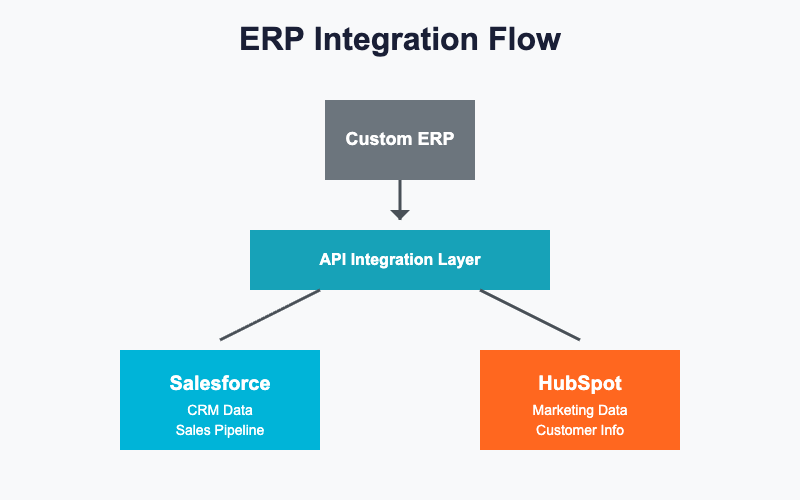
When you're tasked with integrating a CRM platform into your custom ERP system, the choice between Salesforce and HubSpot isn't just about features—it's about how smoothly those features play with your existing infrastructure. As a developer who's spent countless hours wrestling with both platforms, I'm breaking down the real differences that matter when you're building integrations.
Salesforce uses OAuth 2.0 with a connected app architecture. You'll need to create a connected app in Salesforce, manage consumer keys and secrets, and handle token refresh logic. The process is robust but comes with a learning curve, especially when dealing with different org types (sandbox vs. production).
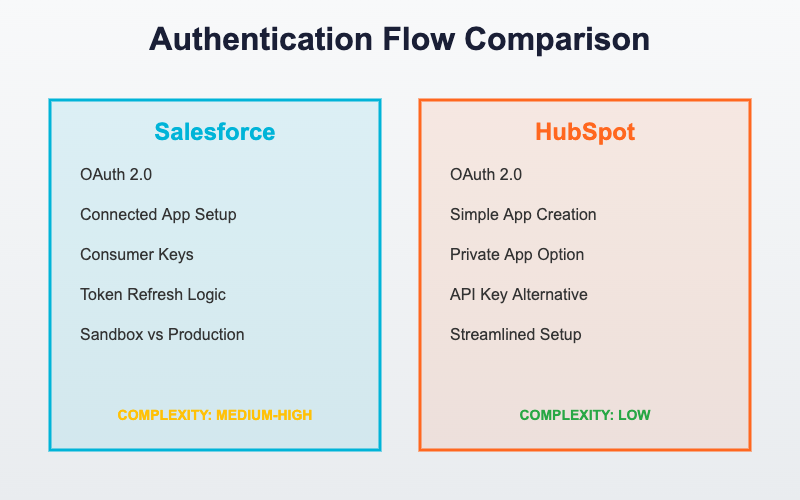
HubSpot also relies on OAuth 2.0, but the setup feels more streamlined. Their developer portal makes app creation straightforward, and the authentication flow is less complex. Private apps offer an even simpler alternative using API keys for server-to-server connections, which can be ideal for internal ERP integrations.
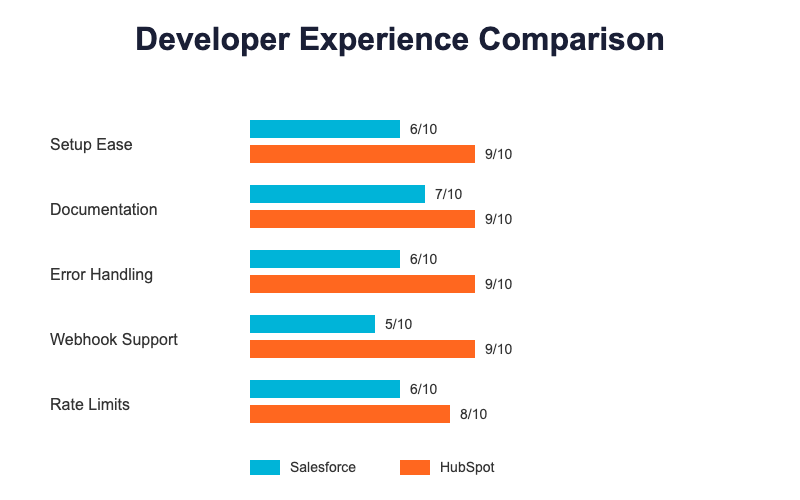
Winner for ease: HubSpot edges ahead here with simpler implementation and clearer documentation.
Salesforce offers both REST and SOAP APIs. While the REST API is modern and well-documented, you'll occasionally encounter operations that feel more naturally suited to SOAP. The API follows Salesforce's object model closely, which means understanding Salesforce's data architecture becomes essential.
HubSpot provides a purely RESTful API with intuitive endpoints. The structure follows conventional REST patterns—GET for retrieval, POST for creation, PATCH for updates, DELETE for removal. The learning curve is gentler, especially if you're already familiar with REST principles.
Winner for ease: HubSpot's consistent REST-only approach is more developer-friendly.
Salesforce gives you incredible flexibility with custom objects, fields, and relationships. However, this power comes at a cost—you need to understand Salesforce's metadata API to work effectively with custom configurations. Querying requires SOQL (Salesforce Object Query Language), which adds another layer of complexity.
HubSpot handles custom properties more simply. Creating and managing custom fields through the API is straightforward, and querying uses standard parameters rather than a proprietary language. However, the data model is less flexible for complex business logic.
Winner for ease: HubSpot for straightforward integrations; Salesforce wins if you need complex customization despite the steeper learning curve.
Salesforce enforces API limits based on your license type, typically 15,000 to 100,000 calls per 24 hours. These limits are shared across your entire org, which can cause headaches in organizations with multiple integrations. Bulk API exists for large data operations but requires additional implementation effort.
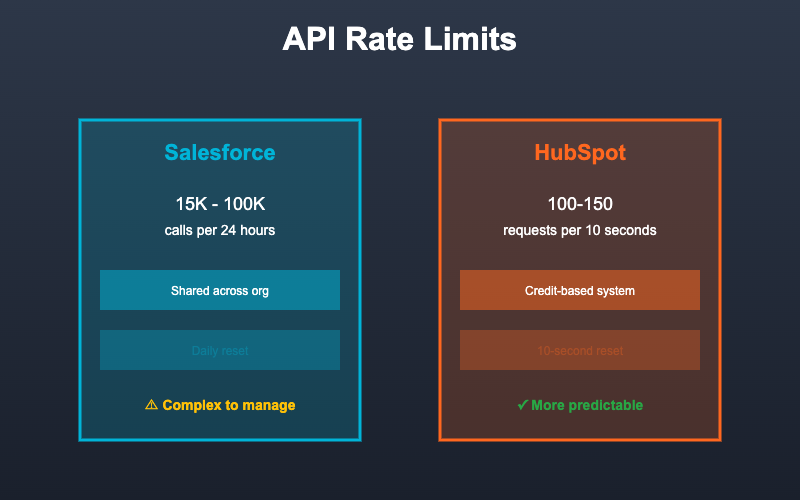
HubSpot uses a credit-based system with limits that reset every 10 seconds. Most accounts get 100-150 requests per 10 seconds, which translates to better real-time performance for many use cases. The limits are more predictable and easier to manage in code.
Winner for ease: HubSpot's credit system is more intuitive and forgiving for developers.
Salesforce provides detailed error messages but they can be cryptic, especially for validation rules or workflow failures. The debugging experience often requires diving into Salesforce's setup interface to understand what went wrong.
HubSpot returns clear, actionable error messages with specific problem descriptions. The error structure is consistent and includes helpful details about what went wrong and how to fix it.
Winner for ease: HubSpot's error messages save significant debugging time.
Salesforce requires setting up Platform Events or using third-party tools like workflow rules with outbound messages. Real-time notifications are possible but require more architectural planning.
HubSpot offers straightforward webhook subscriptions through their API. You specify an endpoint, choose which events to monitor, and you're done. The implementation is clean and reliable.
Winner for ease: HubSpot's native webhook support is far simpler.
Salesforce has comprehensive documentation, but the sheer volume can be overwhelming. Finding the right answer often means navigating through multiple guides, Trailhead modules, and community forums.
HubSpot provides concise, example-rich documentation that gets you up and running quickly. The API reference is well-organized, and code examples cover common use cases in multiple languages.
Winner for ease: HubSpot's focused documentation reduces time-to-implementation.
Salesforce offers official SDKs for major languages, though community libraries often provide better developer experiences. The ecosystem is mature with plenty of tools and frameworks available.
HubSpot provides well-maintained official client libraries for Node.js, PHP, Python, and Ruby. These libraries abstract away much of the complexity and stay current with API changes.
Winner for ease: Tie—both platforms offer solid SDK support.
Syncing Customer Data
For basic customer synchronization between your ERP and CRM, HubSpot's simpler data model and clearer API structure make it faster to implement. You'll likely have a working integration in days rather than weeks.
Complex Business Logic
If your ERP needs to trigger complex workflows, validate against intricate business rules, or manage sophisticated relationships, Salesforce's power becomes necessary despite the complexity.
Real-Time Order Processing
HubSpot's webhooks and reasonable rate limits make it excellent for real-time scenarios where your ERP needs immediate notification of CRM changes.
High-Volume Batch Operations
Salesforce's Bulk API, while requiring more setup, handles large-scale data operations more efficiently for scenarios like nightly inventory syncs.
For most custom ERP integrations, HubSpot is the easier choice. Its straightforward authentication, intuitive API structure, clear documentation, and developer-friendly error handling mean faster development cycles and easier maintenance.
Choose HubSpot if you need to move quickly, have standard integration requirements, and want code that's easy for other developers to understand and maintain.
Choose Salesforce if your integration demands complex customization, sophisticated business logic, or deep integration with Salesforce-specific features. Just budget extra development time and expect a steeper learning curve.
Both platforms are capable—the question isn't which is better, but which matches your team's expertise and your integration's complexity. For straightforward ERP connectivity, HubSpot's simplicity is a genuine advantage that translates directly into reduced development costs and faster time-to-market.

 Oriya
Oriya